Compatible with Chrome and Edge
Instruction Guide
We have a simple tutorial guide which explains the features of the software extension and what each button inside the extension does. Read our tutorial and welcome guide on how to use the extension to the fullest. Use all the features of this browser software.
If you are interested in other web extensions to install, you might wish to check out the Microsoft Bing Search with Rewards extension.
Microsoft Bing Search with Rewards Extension
It allows you to complete daily offers to get points.
Track the number of points you have currently and the rewards you can redeem with these points.
The ways to get points & get rewarded is search with Bing, browse with Microsoft Edge and shop at the Microsoft and Windows stores to earn rewards.
Sponsored Link:
Other useful extensions
Another extension which would be useful to install is the iCloud bookmarks extension.
It allows to keep your Chrome bookmarks on Windows synced up with the Safari bookmarks on your iPhone, iPad, and Mac.
iCloud will store your website bookmarks so it is accessible even on your iPhone and Mac.
Try these other two extensions and see if it will boost your daily productivity.
FREE! Apps Launcher for your browser.
Features:
Install and open.
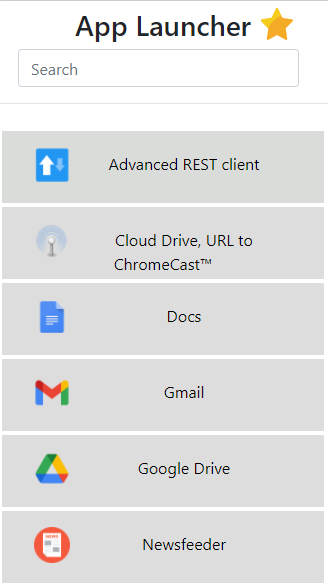
- After installing the extension. You click on the extension icon and can launch any Apps you have installed before.
Chrome apps are a special type of web app in Google's Chrome browser. They're written in HTML, JavaScript and CSS, but they're packaged and distributed through the Chrome Web Store.
Chrome apps can be installed on the user's computer, just like any other Windows application or Mac app. They don't live inside the browser, so they don't have to be reloaded each time you open a new tab or window (unlike regular web pages). And because they're written in HTML5 and JavaScript, you don't need to install any plugins or extensions to use them.
Here are some popular chrome apps.
Evernote. This is a great way to capture and organize all the notes, ideas, and other bits of information that help you be more productive. It's also a great place to store your photos when you want them backed up in the cloud.
Google Drive. A cloud storage solution for documents, photos and videos. You can even edit them online with Google Docs.
LastPass. As its name implies, LastPass makes it easier to remember all your passwords. The service also allows you to create secure notes on any topic, so you can save bits of information that may come in handy later on down the road (this is especially useful when shopping or traveling).
Tutorial:
- Install the Extension
- After installing the extension, click on the icon on the toolbar.
Sponsored Link: